
Paid partnership with Bluehost. This post is sponsored by Bluehost, and I earn a commission if you sign up through my links. Everything below comes from my own hands-on build.
I typed one sentence into Bluehost AI Builder and got a working, multi-page website for a premium gym, with class listings, a weekly timetable, membership plans and a free-trial booking button. I then refined it by chatting, checked it on desktop, tablet and mobile, and published it live. It cost me $0, and I didn’t enter a credit card.
The gym, IRONHAVEN, is made up. It’s a demo business in Jubilee Hills, Hyderabad, created only to test the tool. The name, address, coaches and reviews are fictional. You can see the live demo here: IRONHAVEN demo site.
This review covers how the build went step by step, what the finished site includes, how pricing and credits work, and where the tool fell short. If you run a gym, studio, clinic, agency or any local service business, this will show you whether Bluehost AI Builder is worth trying.
Try Bluehost AI Builder free → · $0 to start, no credit card. I earn a commission.
What is Bluehost AI Builder?
Bluehost AI Builder turns a plain-language description into a website. You describe what you need, answer a few questions, and then refine the design, copy and images by chatting while a live preview updates next to the chat. It replaces Bluehost’s previous AI website builder for new customers. You don’t need any WordPress or coding knowledge.
| Quick facts | |
|---|---|
| What you build | Business websites, portfolios, landing pages, blogs and simple web apps |
| How you build | Describe it in one sentence, then refine by chatting |
| Price | $0 to start, no credit card; paid plans from $20/mo |
| Hosting | Included on every plan |
| Free plan address | A Bluehost subdomain (yourname.app.bluehost.ai) |
| Own domain | Needs a paid plan |
| Support | Real people, 24/7 |
| Not for | Online stores (use Bluehost AI Store) and native mobile apps |
How I built IRONHAVEN with Bluehost AI Builder
The whole build took one evening and fit within the Free plan’s daily credits. Here is each step.
Step 1: Describe the website in one sentence
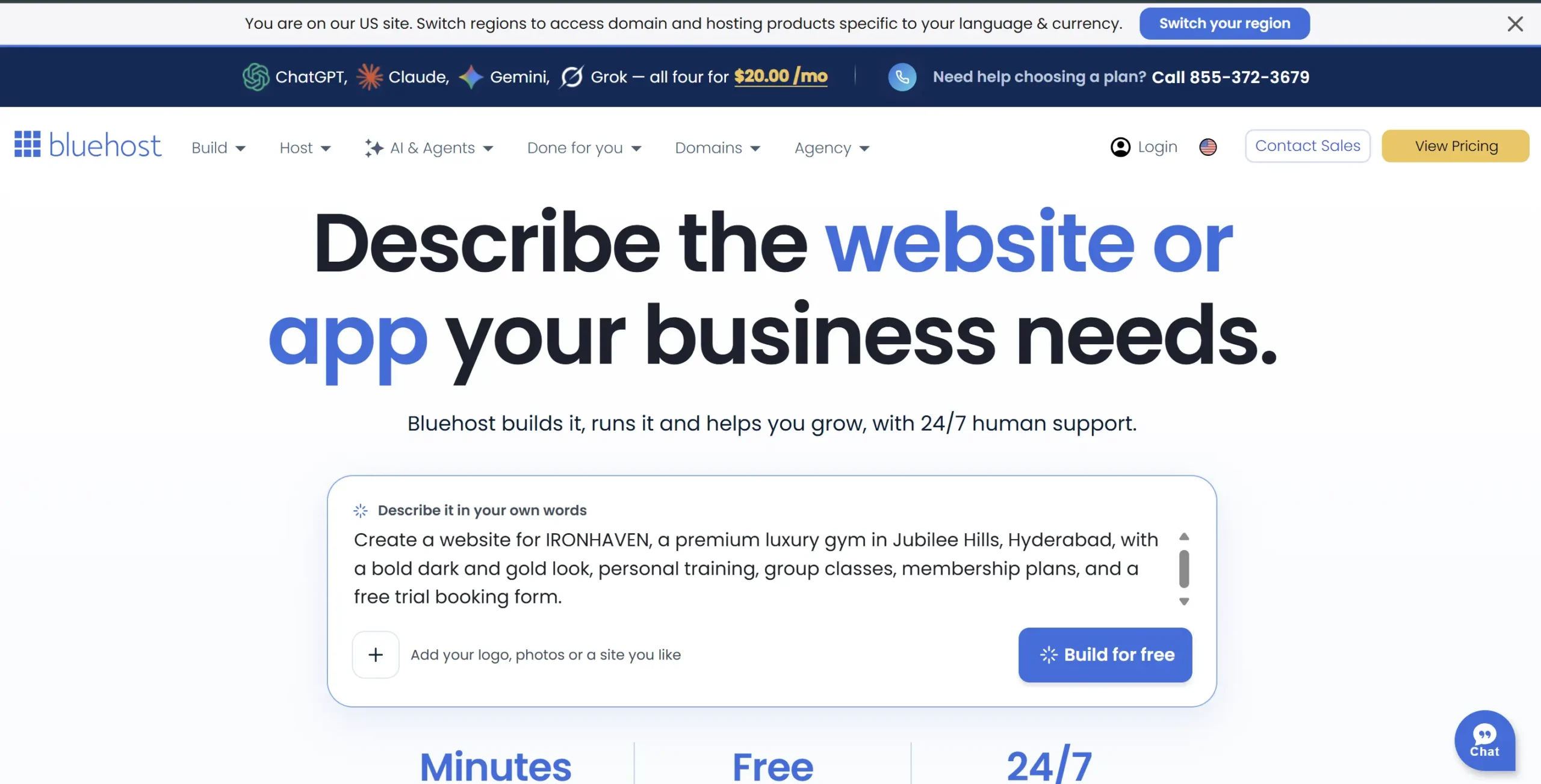
On the Bluehost AI Builder page (I earn a commission), there is a single box labelled “Describe it in your own words.” I typed this:
“Create a website for IRONHAVEN, a premium luxury gym in Jubilee Hills, Hyderabad, with a bold dark and gold look, personal training, group classes, membership plans, and a free trial booking form.”
Under the box you can also add a logo, photos (PNG, JPG or WebP, up to 5 MB each), or a link to a site whose look you like. Then you click Build for free and create an account with Google, Apple, GitHub or email. No card is asked for.
Step 2: Answer the AI’s questions and watch it build
When a description needs more detail, the AI asks clarifying questions before it builds. Those questions are free and don’t use credits. It then builds the site while a live preview fills in on the right side of the screen.
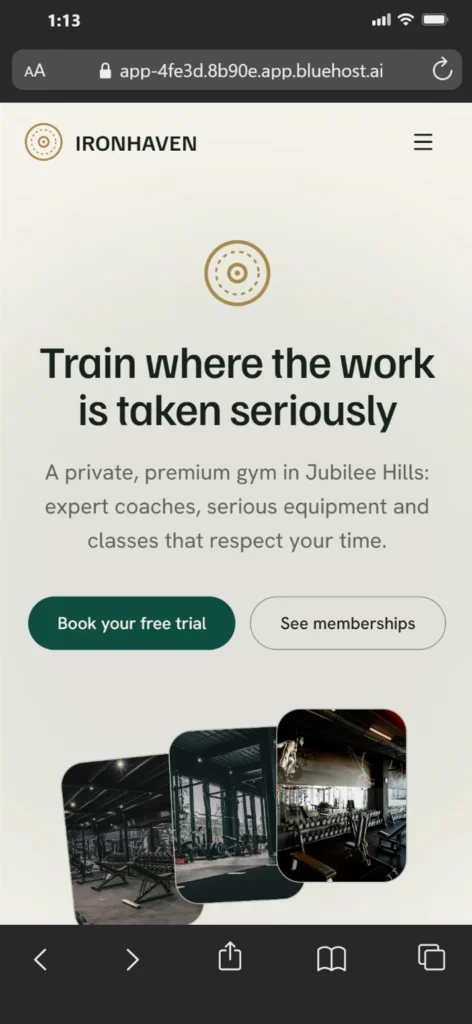
My first version already had a proper structure: a hero section with “Book your free trial” and “See memberships” buttons, a classes section, a membership page, an about page and a contact page. The headline it wrote, “Train where the work is taken seriously,” was better than what I would have written myself.
Step 3: Refine it by chatting
This is where Bluehost AI Builder feels different from a template builder. You don’t drag blocks around. You type what you want changed, in plain words.
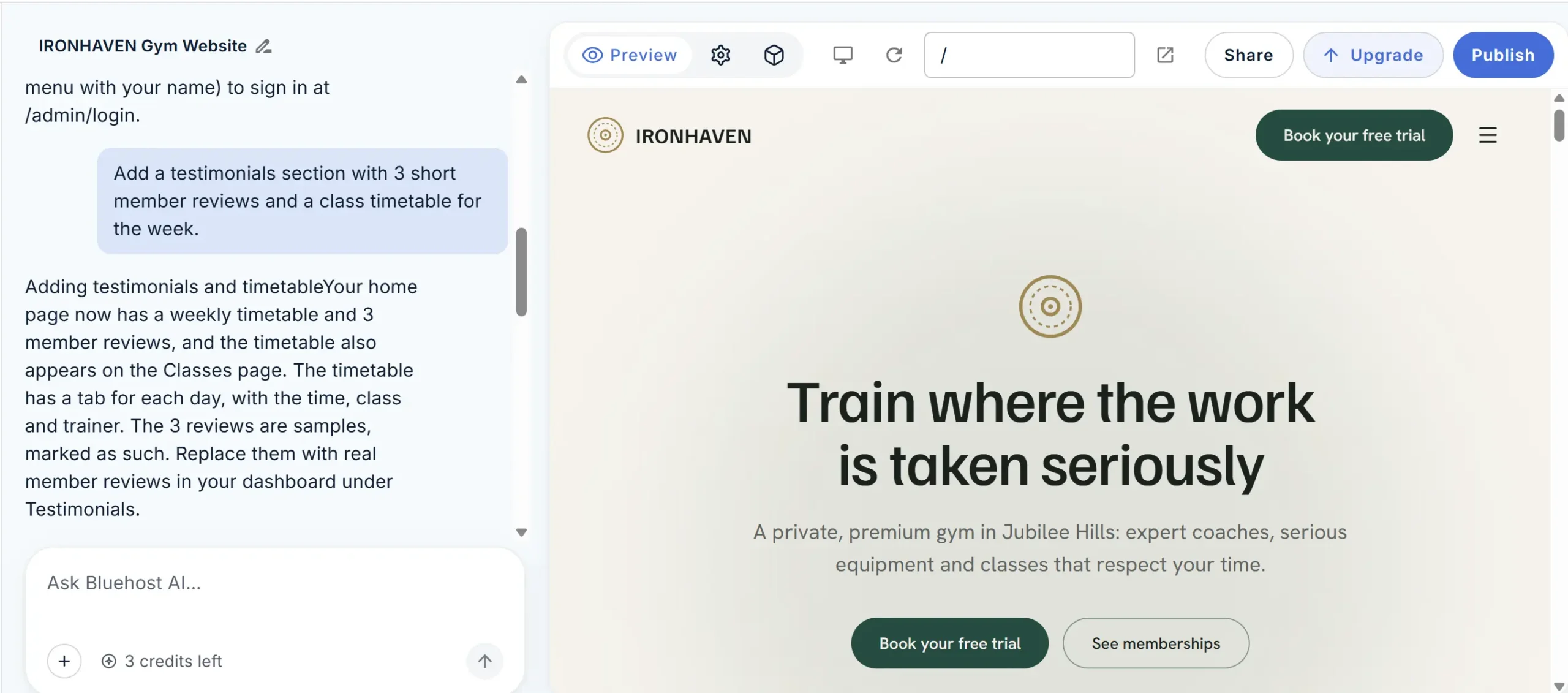
My first edit asked for a testimonials section with three short member reviews and a weekly class timetable. The AI added both, placed the timetable on the Classes page too, and built it with a tab for each day showing time, class and trainer. It also labelled the three reviews as samples and told me to replace them with real reviews in the site’s dashboard under Testimonials. I liked that it didn’t pass off invented reviews as real.
My second edit was about branding. I gave it an exact colour code (#0e4d40), asked for realistic gym photos and realistic Indian coach images, and asked for better coach names. It switched the site to deep green on an ivory background with champagne-gold accents, and renamed the coaches to fit a Hyderabad gym.
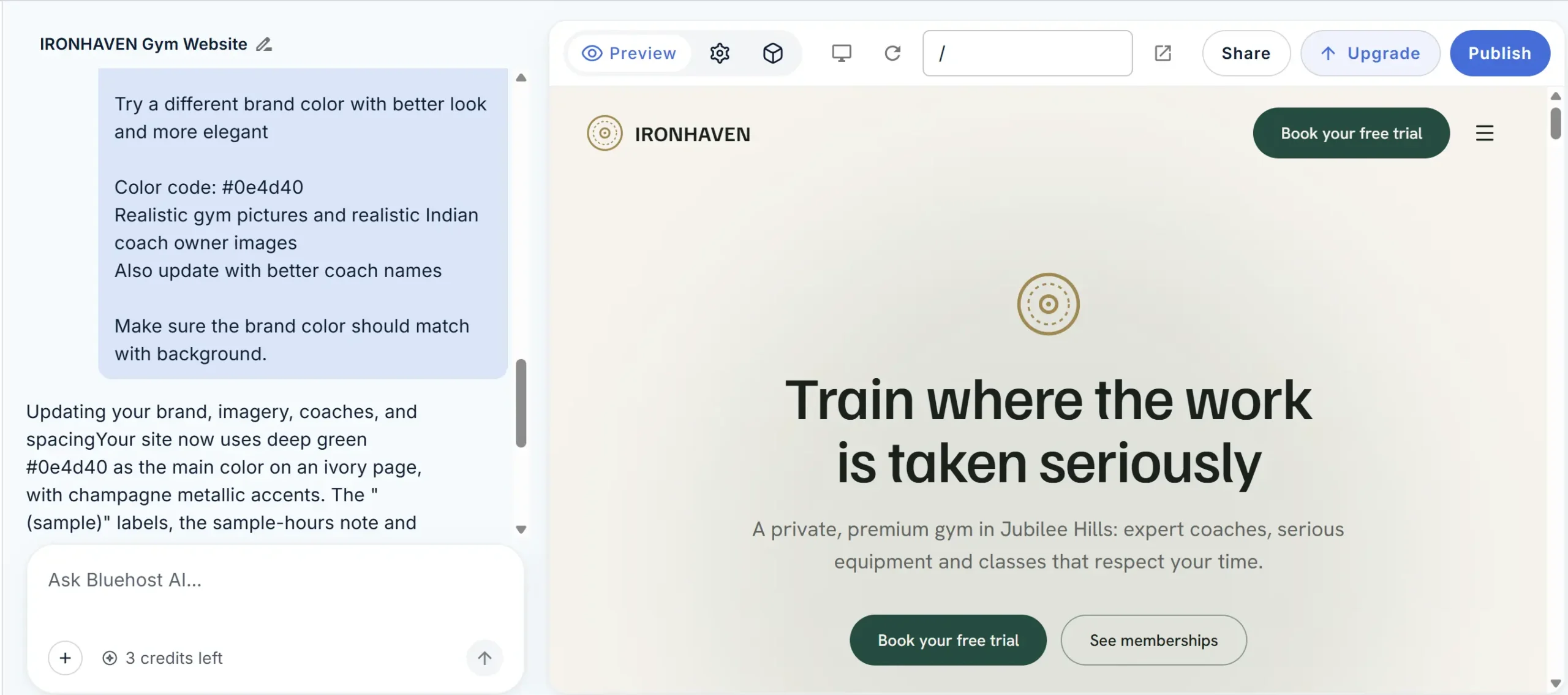
Each of these messages used one credit. Packing several related changes into one message, as I did here, gets far more done per credit.
Step 4: Check desktop, tablet and mobile views
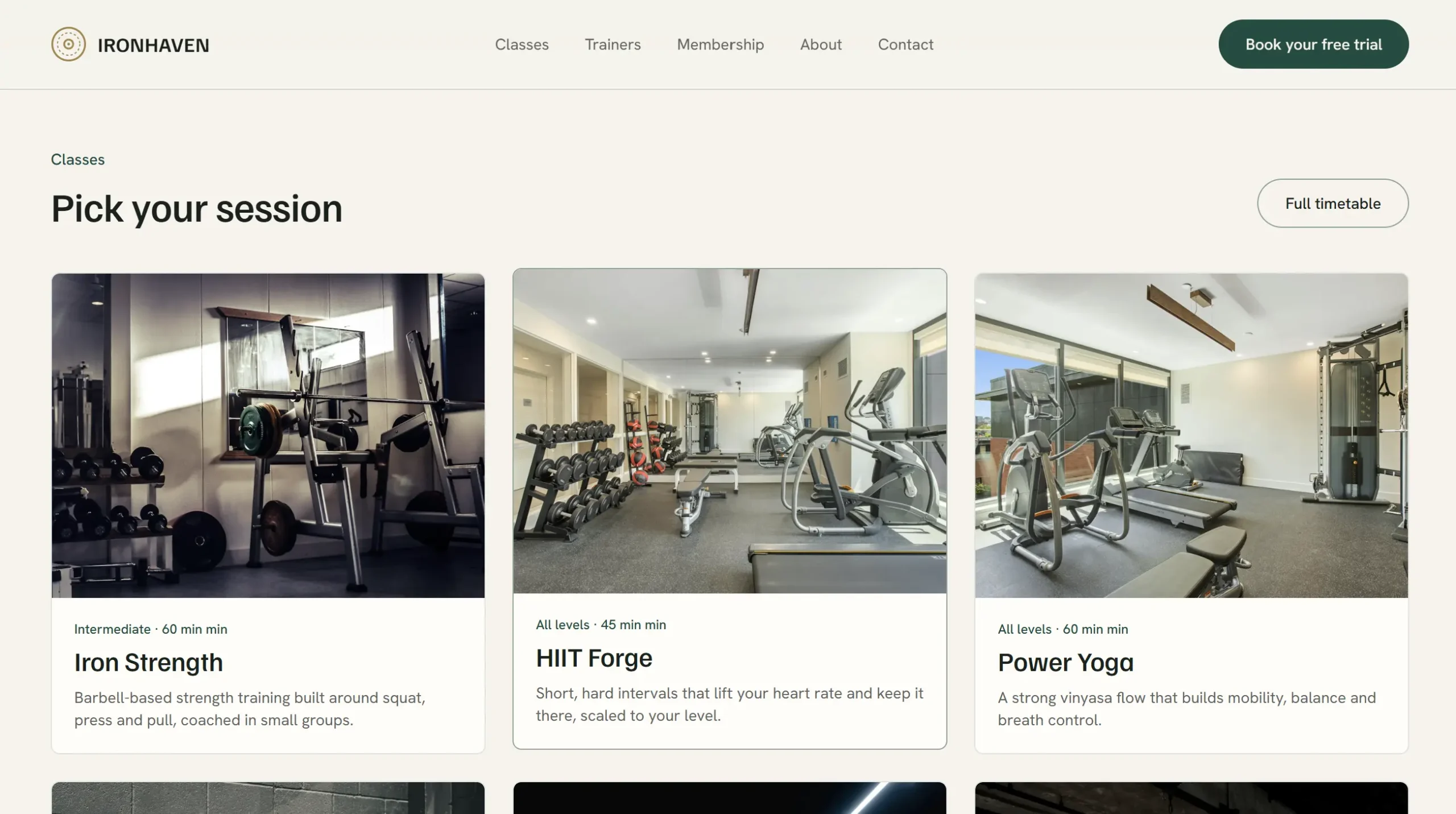
The toolbar above the preview switches between desktop, tablet and mobile. On desktop, the Classes page shows a three-column grid of class cards: Iron Strength, HIIT Forge, Power Yoga, Boxing Elite, Spin Rhythm, and Mobility and Recovery.
On a phone, everything stacks into one clean column: the hero, class cards, the day-by-day timetable, reviews, the three membership plans and the coaches. Buttons stayed large enough to tap, and nothing overflowed the screen.
Step 5: Publish
One click on Publish put the site live at a free Bluehost subdomain: app-4fe3d.8b90e.app.bluehost.ai. After publishing, you can keep changing design, copy, images or layout in the same chat and review updates before publishing again. The site also comes with an admin login, so the owner can manage content like testimonials without using chat credits.
What the finished gym website includes
After a handful of chat messages, IRONHAVEN had everything a real premium gym would need on its first website:
- Pages: Home, Classes, Trainers, Membership, About and Contact, linked from a clean top menu.
- A clear call to action: “Book your free trial” appears in the header, the hero and the plan cards.
- Six class cards, each with level, duration, a photo and a two-line description.
- A weekly timetable with day tabs, showing the time, class, coach and spots available.
- Three membership plans (Essential, Elite and Black) in rupees, with feature lists and a “Most chosen” badge on the middle plan.
- Coach profiles with photo, role and years of experience.
- Sample testimonials, clearly marked as samples, to be replaced with real ones.
- SEO basics: Bluehost AI Builder generates page titles, descriptions, headings and image alt text automatically.
- Mobile-responsive layout that works in any browser on phones, tablets and computers.
A small gym owner would normally pay a freelancer for most of this. Getting a solid first draft in minutes, then shaping it by chatting, is the real value here.
Bluehost AI Builder pricing and how credits work
Bluehost AI Builder is $0 to start, no credit card, and paid plans from $20/mo. Hosting is included on every plan, and hosting never uses credits. Prices are in USD and paid plans are billed monthly.
| Plan | Price | Credits | Best for |
|---|---|---|---|
| AI Builder Free | $0, no credit card | 5 a day, up to 30 a month | Testing the tool and publishing on a Bluehost subdomain |
| AI Builder Lite | $20/mo | 100 a month | One business site on your own domain |
| AI Builder Standard | $40/mo | 200 a month | Frequent changes |
| AI Builder Pro | $80/mo | 400 a month | Several websites |
Plans and prices as listed by Bluehost in November 2026.
How credits work
- One chat message uses one credit. The AI’s clarifying questions are free.
- Monthly credits and top-ups expire after 30 days. Top-ups come in packs of 50, 100 or 200 credits, starting at $15.
- Your site stays online at zero credits. When credits run out, only new changes pause until credits refresh or you top up. The published website keeps working.
- Your own domain needs a paid plan. The Free plan publishes on a Bluehost subdomain. Lite, Standard and Pro let you connect your own domain inside the builder.
In my build, 5 daily credits were enough for a solid site because I grouped related changes into single messages. If you like to tweak one small thing at a time, you’ll hit the daily limit quickly on the Free plan.
Pros and Cons from my build
| What I liked | What could be better |
|---|---|
| One sentence produced a complete multi-page site, not just a homepage | Free plan’s 5 credits a day limits how much you can iterate in one sitting |
| Chat edits handled several changes at once and followed an exact colour code | My “dark and gold” request became a light ivory design; I had to steer it |
| Sample reviews were clearly labelled, not passed off as real | Small text glitches, like “60 min min” on class cards, need a manual check |
| Looked polished on desktop, tablet and mobile without extra work | Own domain needs a paid plan; the free subdomain isn’t ideal for a real business |
| Free to publish live, with no credit card | Not for online stores or native mobile apps |
| Site stays online even at zero credits | Sample content (coaches, reviews, timings) all needs replacing with real details |
None of the downsides stopped me from getting a usable site. But treat the first version as a strong draft. Read every line before you publish it for a real business.
Who should use Bluehost AI Builder?
It’s a good fit if you are:
- A gym, yoga studio, salon, clinic, café or other local business that needs a professional site fast.
- A freelancer or consultant who wants a portfolio or service site without learning WordPress.
- A marketer who needs a quick landing page for a campaign or event.
- An agency or freelancer who wants to show a client a working draft in the first meeting.
- Anyone who wants to try an AI website builder for free before paying anything.
Look elsewhere if you:
- Want to sell products online. Bluehost AI Builder doesn’t support ecommerce yet. For a store, use Bluehost AI Store instead.
- Need a native app for the Apple App Store or Google Play.
- Want full control over code, plugins and themes. A regular WordPress hosting plan suits that better.
Tips to get better results (and save credits)
- Put the essentials in your first sentence. Include the business name, type, city, the look you want and the key features. Mine named the gym, the area, the colours, the services and the booking form.
- Upload a logo or show it a site you like. This steers the design much faster than describing colours in words.
- Group related changes into one message. “Change the brand colour to #0e4d40, use realistic gym photos and rename the coaches” costs one credit. Three separate messages cost three.
- Give exact values. Hex colour codes, prices, timings and addresses get applied precisely. Vague requests like “make it nicer” leave the AI guessing.
- Check every view before publishing. Flip through desktop, tablet and mobile, and read all generated text for small errors.
- Replace sample content. Swap in your real reviews, coach photos, timings and contact details before you share the site with customers.
My verdict
Bluehost AI Builder is one of the easiest ways I’ve found to go from an idea to a live business website. One sentence gave me a complete, mobile-friendly gym site, and a few chat messages turned it into something that looked like a real premium brand. The Free plan let me build and publish it without paying or adding a card.
It isn’t perfect. The first draft needed steering, the daily credit limit on the Free plan is tight, and you’ll need a paid plan to use your own domain. But for a small business that needs a good-looking site this week, or a freelancer who wants to show clients a working draft fast, it’s well worth trying.
Build your website with Bluehost AI Builder →
$0 to start, no credit card. Paid plans from $20/mo. I earn a commission.
FAQs
Is Bluehost AI Builder really free?
Yes. It’s $0 to start, no credit card. The Free plan lets you build and publish a live site on a Bluehost subdomain with 5 credits a day, up to 30 a month. Paid plans from $20/mo add more credits and your own domain.
Can I use my own domain on the Free plan?
No. The Free plan publishes on a Bluehost subdomain. Connecting your own domain needs Lite, Standard or Pro. Registering or renewing a domain is a separate cost.
What happens when I run out of credits?
Your published site stays online. Only new changes pause until your credits refresh or you buy a top-up.
Do I need coding or WordPress skills?
No. You describe what you want and request changes in plain language.
Can I build an online store with it?
Not yet. Bluehost AI Builder doesn’t support ecommerce. Bluehost points store owners to Bluehost AI Store.
Will my site rank on Google?
The builder generates page titles, descriptions, headings and alt text, and every site is mobile-responsive. Rankings still depend on your content, location and competition, so no website builder can promise a position.
Can I edit the site after publishing?
Yes. Keep chatting to change design, copy, images or layout, review the update, then publish again.
Is there human support?
Yes. Real people help 24/7 during the build and after launch, with changes, domains, email and hosting.