
If you have looked into live chat or AI customer support tools recently, you have probably seen Tidio’s name come up next to Intercom, Zendesk, and Gorgias. What makes Tidio worth a second look in 2026 is Lyro, its AI agent built on Anthropic’s Claude models, which now resolves close to 67% of incoming conversations without a human ever stepping in.
We compared Tidio’s current plans against real user reviews across G2, Tooltester, Chatimize, and Chatsy, then checked those claims against what Tidio actually ships today. Here is the full picture, including where Tidio earns its price tag and where it still falls short.
Quick Answer
- Best for: small to medium ecommerce and service businesses that want live chat and an AI agent in one tool, without a big setup lift.
- Standout feature: Lyro AI agent, built on Claude, trains itself on your existing help content and resolves roughly 67% of conversations on its own.
- Starting price: free for up to 50 conversations a month. Paid plans start at $29 a month, and Lyro usage beyond the free allowance is billed per conversation.
- Look elsewhere if: you run a large support team that needs advanced routing, co browsing, or enterprise grade reporting.
What Is Tidio?
Tidio is a customer service platform that combines live chat, a help desk, marketing automation flows, and an AI agent into a single dashboard. It is used by more than 300,000 businesses, most of them small to medium sized online stores and service brands, and it holds a 4.6 out of 5 rating on G2 across close to 1,960 reviews.
The pitch is simple. Instead of stitching together a chat widget, a chatbot builder, and a ticketing tool from three different vendors, Tidio puts all three under one roof, then layers Lyro on top to handle the repetitive questions automatically.
You can create a free account and try the core chat and automation tools without entering a credit card. Get started with Tidio here
Lyro AI Agent: What It Actually Does
Lyro is the part of Tidio that has changed the most this year, and it is the reason Tidio is worth revisiting even if you looked at it a year or two ago.
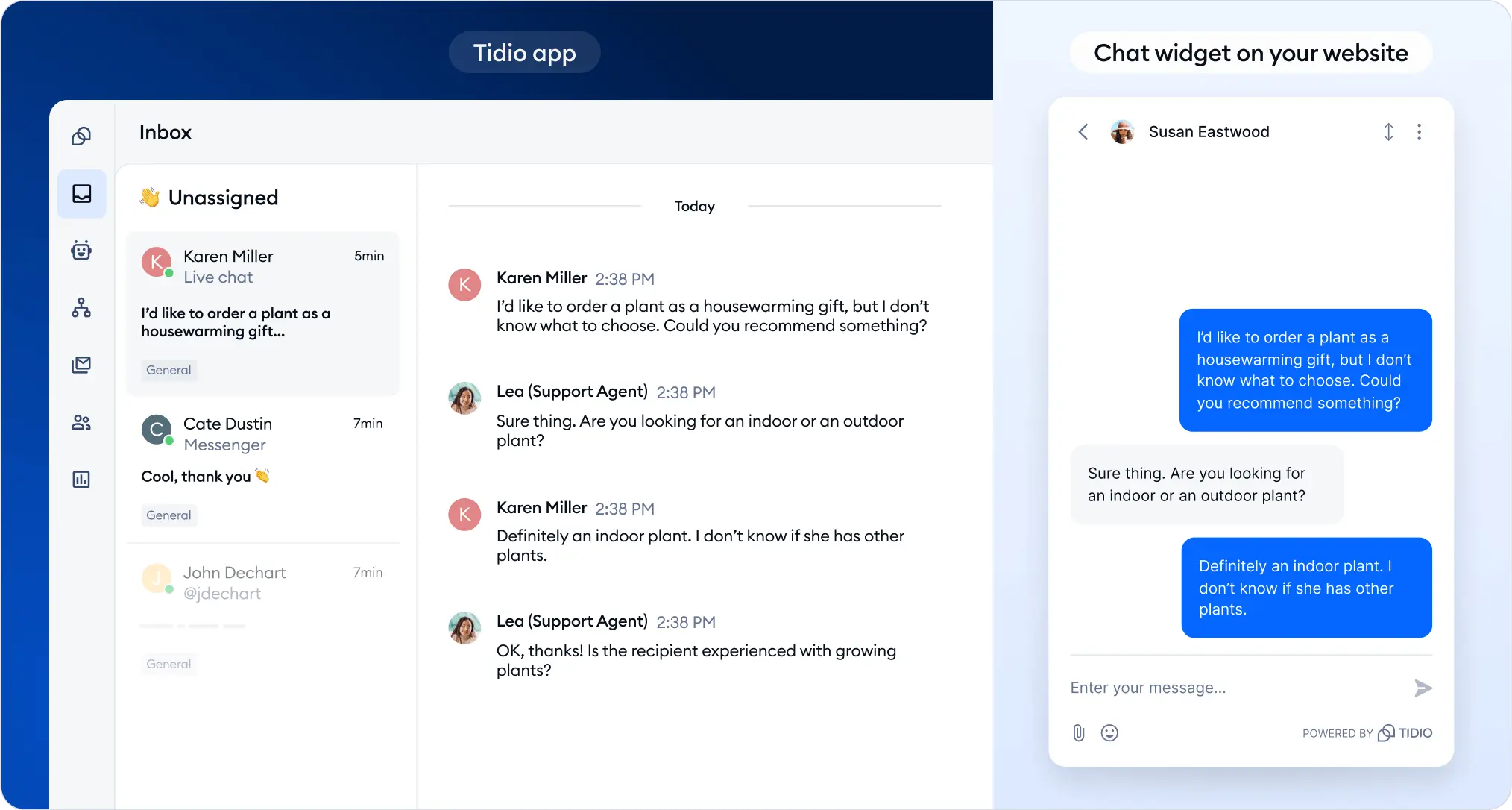
Instead of asking you to write scripts or train a bot line by line, Lyro reads your existing help center articles, FAQ pages, and product content, then uses that as its own knowledge base. When a customer asks a question, Lyro answers using only what it learned from your content, which keeps it from making things up or guessing at an answer.
What Lyro can do on its own
- Answer product, shipping, and policy questions using your existing help content
- Check order status and shipping updates directly for Shopify and WooCommerce stores
- Recommend products based on what a shopper is asking about
- Qualify leads and hand off warm conversations to your sales team
- Match your brand’s tone of voice, with adjustable personality settings
- Escalate to a human agent automatically when it does not have a confident answer
According to Tidio’s own data, Lyro resolves an average of 67% of conversations without any human involvement, and some independent reviewers report figures closer to 70 percent once a store’s knowledge base is filled in properly. Reviewers also note that Lyro’s multi turn conversation handling improved noticeably through 2026, meaning it now holds context across several back and forth messages instead of resetting after each question.
The most important thing to understand about Lyro is that it is built on Claude, Anthropic’s AI model, rather than a generic chatbot framework. Tidio positions this as a safety feature. Lyro is designed to stay within the boundaries of your uploaded content instead of inventing answers, and the platform carries SOC 2 and HIPAA compliance for businesses that handle sensitive customer data.
One thing worth setting expectations on: several reviewers point out that Lyro needs a short learning period after setup before its answers feel sharp, so plan for a few days of monitoring and correcting responses rather than expecting a perfect result on day one.
Every Tidio account includes 50 free Lyro conversations a month to test it out. Beyond that, Lyro usage is billed per conversation on paid plans, which we break down in the pricing section below.
Key Features Beyond Lyro
Lyro gets most of the attention, but Tidio’s other tools are what make it a full customer service platform rather than just an AI widget.
Live chat and unified inbox
A clean, modern chat widget that visitors can use to reach a human agent in real time. Website chat, email, Facebook Messenger, Instagram DMs, and WhatsApp all land in one inbox, and the widget supports around 20 pre translated languages. A live visitor list lets you see who is on your site before they even message you.
Flows, the automation builder
A drag and drop workflow builder with more than 40 templates for common scenarios like abandoned cart recovery, welcome messages, and lead qualification. Reviewers consistently call this one of Tidio’s strongest features because it requires no coding at all.
Help desk and ticketing
Tidio has expanded its help desk tools so conversations that need follow up convert into tickets your team can track, rather than getting lost in a chat history. It remains lighter than a dedicated help desk platform, so support heavy teams should weigh this against Zendesk or Intercom.
Integrations
- Shopify and WooCommerce, with access to real order and product data
- WordPress, plus Facebook Messenger, Instagram, and WhatsApp
- Zendesk, Intercom, and Salesforce for teams migrating or running Lyro alongside an existing help desk
- Zapier for connecting to email marketing and CRM tools that are not natively supported
One limitation worth flagging: Tidio relies heavily on Zapier for niche integrations rather than offering many native connections, so teams with more complex data pipelines may need an extra workaround step.

Tidio Pricing in 2026
Tidio’s pricing has two layers. There is a base plan for live chat, flows, and the help desk, and there is Lyro usage, which is billed separately once you go past the free monthly allowance. This is the single most common source of confusion in reviews, so we have broken it out clearly below.
| Plan | Starting Price | What You Get |
| Free | $0 a month | 50 conversations a month, up to 3 chat operators, basic flows, and 50 free Lyro conversations |
| Starter | From $29 a month | More monthly conversations, a live visitor list, and priority support |
| Growth | From $59 a month | Higher conversation volume, advanced analytics and permissions, plus metered Lyro conversations |
| Enterprise / Tidio+ | Custom pricing | Unlimited conversations, dedicated support, and enterprise level Lyro usage |
Plan names and limits have shifted more than once over the past year, so treat the figures above as a general guide rather than a locked in quote. Confirm current numbers on Tidio’s pricing page, or start with the free plan through our link and upgrade once you know your real conversation volume
The most common complaint across reviews is that Lyro conversations and chatbot flow visitors are metered separately from the base plan, which makes the final bill harder to predict than a flat monthly fee. If your traffic is seasonal or spiky, budget some room above your average usage before you commit to a paid tier.
Pros and Cons
What we like
- Genuinely usable free plan, not a crippled trial
- Lyro sets up in minutes and trains itself from content you already have
- Clean, modern interface that is easy to learn without a manual
- Strong Shopify and WooCommerce integration for order and product questions
- Automation flows are visual and require no coding knowledge
- Built on Claude, with SOC 2 and HIPAA compliance for data handling
- Smooth handoff from Lyro to a human agent when needed
Where it falls short
- Lyro’s per conversation pricing can get unpredictable during traffic spikes
- No advanced routing, co browsing, or voice calling for larger support teams
- Removing the Tidio branding on the widget costs extra on lower plans
- Relies heavily on Zapier for niche CRM or data integrations
Who Should Use Tidio?
Tidio is a strong fit if you are:
- Running a Shopify or WooCommerce store and want an AI agent that can answer order and product questions automatically
- A small team of 1 to 10 agents that wants live chat, automation, and an AI agent without hiring extra support staff
- New to live chat tools and want something you can set up in under an hour, not a week
- Looking to cut down repetitive support tickets before scaling your support headcount
You may want to look elsewhere if you are:
- A mid sized or enterprise support team that needs advanced routing, SLAs, or co browsing
- Already using a large help desk like Zendesk or Intercom and only need a narrow AI add on for that platform
- Working with a support volume high enough that per conversation Lyro pricing becomes harder to predict month to month

FAQs
Is Tidio actually free to use?
Yes. The free plan includes 50 conversations a month, up to 3 chat operators, basic automation flows, and 50 free Lyro AI conversations. It is a real working plan, not just a time limited trial.
What is Lyro and how is it different from a normal chatbot?
Lyro is Tidio’s AI agent, built on Anthropic’s Claude models. Instead of following a fixed script, it reads your existing help content and answers questions using only that information, then hands off to a human when it is not confident in an answer.
How much does Lyro cost after the free conversations run out?
Paid Lyro usage is billed per conversation on top of your base plan. Costs scale with how many conversations Lyro handles each month, so it is worth estimating your volume before upgrading to avoid surprise charges.
Does Tidio work with Shopify and WooCommerce?
Yes. Both integrations let Lyro and the live chat widget pull real order status, shipping information, and product details directly into a conversation.
Can Lyro fully replace a human support team?
Not entirely. Lyro resolves around 67% of conversations on average, which reduces the workload significantly, but it is designed to escalate the remaining conversations to a human agent rather than force an answer.
Does Lyro work well right after setup?
It gets better with time. Reviewers report that Lyro needs a short learning period after you connect your knowledge base, so plan to monitor its early answers and correct any gaps before relying on it fully.
Is Tidio good for large enterprise support teams?
It can work through the Enterprise plan, but most reviewers agree Tidio is built with small and medium businesses in mind. Enterprise teams that need heavy routing rules or detailed reporting may be better served by Zendesk or Intercom.
Final Verdict
Tidio earns its spot on our list of customer service tools worth trying in 2026, mainly because of how far Lyro has come. A 67% automatic resolution rate is a real number backed by independent reviews, not just a marketing line, and the fact that Lyro trains itself from content you already have means most stores can get real value out of it within days, not a full quarter.
Where Tidio asks for patience is on pricing. Budget for Lyro’s per conversation cost separately from your base plan, and expect to outgrow the free tier faster than you expect if your site gets steady traffic. For a small to medium ecommerce or service business that wants live chat and AI support without a long setup process, Tidio is one of the more practical options available right now.
You can start on Tidio’s free plan and test Lyro on your own site here