This post contains affiliate links. If you make a purchase through these links, I may earn a commission at no extra cost to you.
If you have been holding off on adding plugins to your WordPress.com site because you could not justify the cost of a Business plan, that barrier just disappeared.
WordPress.com has officially opened up access to 50,000+ plugins on every single paid plan including the most affordable Personal plan. On top of that, features like Global Styles, font uploads, and CSS customization are now included across the board.
This is not a minor update. For bloggers, small business owners, and anyone building a site on a budget, this changes the entire equation. You no longer have to choose between affordability and functionality.
Let me break down exactly what changed, what it means for you, and how to take advantage of it right now.
What Actually Changed on WordPress.com?
For years, one of the biggest frustrations with WordPress.com was its plugin restrictions. If you wanted to install any third-party plugin whether that was an SEO tool, a contact form, or WooCommerce for your online store, you needed at least a Business plan. That meant paying significantly more just to unlock the full power of WordPress.
The Personal and Premium plans gave you a solid website builder, but they kept the plugin ecosystem locked behind a paywall. Many users either upgraded before they were ready or left the platform entirely because they felt limited.
That has now changed in a big way.
Here is what every paid WordPress.com plan now includes:
- Full access to 50,000+ plugins from the WordPress plugin directory
- Global Styles for site-wide design customization
- Font uploads so you can use your own brand typography
- CSS customization for fine-tuned design control
Whether you are on the Personal plan or the eCommerce plan, these features are yours. No more artificial gatekeeping. No more upgrading just to install a simple plugin.
This means a blogger on the $4/month Personal plan now has access to the same plugin library as someone on the $45/month eCommerce plan. The playing field hasbeen leveled.
Why This Is a Big Deal for Bloggers and Small Businesses
You might be thinking, “Okay, so they unlocked plugins. Why should I care?” Here is why this matters more than it sounds.
Real Cost Savings
Previously, if you needed even one plugin say Rank Math SEO to optimize your blog posts, you had to jump to the Business plan at $33/month. That is a significant expense when you are just starting out and every dollar counts.
Now you can get plugin access starting from the Personal plan. That is a potential savings of hundreds of dollars per year while still getting the tools you need to grow your site.
Access to Every Use Case Imaginable
With 50,000+ plugins available, there is a solution for virtually every problem you will face as a site owner. Need a booking system? There is a plugin. Want to add a podcast player? There is a plugin. Looking to build an email list? Multiple plugins handle that beautifully.
You are no longer limited to whatever built-in features your plan happens to include.
Full Design Control Without Coding
Global Styles and font uploads mean you can make your site look exactly the way you want without touching a single line of code. And if you do know some CSS, you now have that option on every plan too.
What Each Paid Plan Now Includes
Here is a quick comparison so you can see what you get at each level:
| Feature | Personal ($4/mo) | Premium ($8/mo) | Business ($33/mo) | eCommerce ($45/mo) |
|---|---|---|---|---|
| 50,000+ Plugins | Yes | Yes | Yes | Yes |
| Global Styles | Yes | Yes | Yes | Yes |
| Font Uploads | Yes | Yes | Yes | Yes |
| CSS Customization | Yes | Yes | Yes | Yes |
| Custom Domain | Yes | Yes | Yes | Yes |
| Premium Themes | No | Yes | Yes | Yes |
| Advanced SEO Tools | No | Yes | Yes | Yes |
| Google Analytics Integration | No | Yes | Yes | Yes |
| SFTP & Database Access | No | No | Yes | Yes |
| WooCommerce Features | Basic via plugin | Basic via plugin | Full | Full + extensions |
The key takeaway: the core plugin and design features are no longer tiered. You get them everywhere.
What Can You Do with 50,000+ Plugins?
Having access to 50,000+ plugins is one thing. Knowing which ones actually matter is another. Here are the categories that will make the biggest difference for most site owners.
SEO and Search Visibility
- Yoast SEO – The most popular SEO plugin. Helps you optimize every post and page for search engines with real-time content analysis, meta descriptions, and XML sitemaps.
- Rank Math – A powerful alternative to Yoast with built-in schema markup, keyword tracking, and a clean interface that many users prefer.
- All in One SEO (AIOSEO) – Another solid option with a beginner-friendly setup wizard and advanced features for experienced users.
E-commerce
- WooCommerce – The gold standard for selling products online through WordPress. Build a full online store with product pages, shopping carts, payment processing, and shipping options.
- Easy Digital Downloads – Perfect if you sell digital products like ebooks, templates, or software.
Forms and Lead Generation
- WPForms – A drag-and-drop form builder that makes it easy to create contact forms, surveys, payment forms, and newsletter signups.
- Gravity Forms – A more advanced option for complex forms with conditional logic and integrations.
- OptinMonster – Build email opt-in popups, slide-ins, and floating bars to grow your subscriber list.
Security and Backups
- Wordfence Security – A comprehensive security plugin with a firewall, malware scanner, and login security features.
- Sucuri Security – Another excellent security solution with activity auditing and remote malware scanning.
- UpdraftPlus – Scheduled backups to cloud storage so you never lose your content.
Performance Optimization
- WP Super Cache – Generates static HTML files from your dynamic WordPress blog, making page loads faster.
- Smush – Compresses and optimizes your images automatically to improve load times without sacrificing quality.
- Autoptimize – Aggregates and minifies your CSS and JavaScript for faster page rendering.
Social Media Integration
- Social Snap – Adds customizable social sharing buttons and tracks how your content performs on social platforms.
- Revive Old Posts – Automatically shares your older content on social media to keep driving traffic to it.
Analytics and Tracking
- MonsterInsights – Connects Google Analytics to your WordPress dashboard so you can see your traffic data without leaving your site.
- Site Kit by Google – An official Google plugin that brings Search Console, Analytics, AdSense, and PageSpeed Insights data into WordPress.
This is barely scratching the surface. Whatever you need your site to do, there is very likely a plugin that does it and now you can install it on any paid plan.
Global Styles, Font Uploads, and CSS – Design Freedom Explained
Plugins get all the attention, but the design features that WordPress.com unlocked across all plans are just as significant if you care about how your site looks and feels.
What Global Styles Lets You Do
Global Styles gives you control over the visual appearance of your entire site from one central place. Instead of tweaking colors, fonts, spacing, and layout options page by page, you set them once and they apply everywhere.
Want to change your heading color from black to dark navy? One change, and every heading on your site updates instantly. Want to adjust the spacing between paragraphs site-wide? Global Styles handles that.
This feature used to be reserved for higher-tier plans. Now it is available to everyone, which means even a brand new blogger on the Personal plan can create a polished, professional-looking site.
How Font Uploads Work
Your website’s typography says a lot about your brand. With font uploads, you are no longer limited to the fonts that come pre-installed with your theme. You can upload your own custom fonts including brand fonts you have purchased or designed and use them across your site.
This is particularly valuable if you are building a business brand and need consistency between your website, social media graphics, and printed materials. Upload your font files, activate them in your theme settings, and you are done.
CSS Customization for Advanced Users
If you know your way around CSS or you are willing to learn the basics. CSS customization lets you fine-tune virtually any visual element on your site. Adjust button sizes, change hover effects, modify spacing, customize your navigation menu, the possibilities are wide open.
Even if you are not a CSS expert, there are thousands of free CSS snippets available online for common WordPress tweaks. Copy, paste, save. It really can be that simple.
Why This Matters for Branding
Here is the bottom line: your website is often the first impression someone has of your business or blog. When you can control your fonts, colors, spacing, and layout from day one without paying for an expensive plan, you can create a site that looks intentional and professional right from the start.
You do not need a designer. You do not need a developer. You just need a WordPress.com paid plan and a clear idea of how you want your site to look.
Who Benefits Most from This Change?
This update is good news for just about every WordPress.com user, but some groups stand to gain more than others.
Bloggers Starting Out
If you are launching a blog and working with a tight budget, this is exactly what you have been waiting for. You can start with the Personal plan at $4/month and still install the essential plugins you need like SEO tools, contact forms, social sharing buttons, analytics. Previously, you would have needed to spend eight times that amount for the same capabilities. Now you can invest that money into content, design, or marketing instead.
Small Business Owners
Running a small business means wearing a lot of hats, and your website needs to work as hard as you do. With plugin access on every plan, you can add appointment booking, customer testimonials, Google Maps, live chat, and dozens of other features without blowing your budget. You get a professional business website without the professional price tag.
Online Store Builders
If you have been thinking about selling products online, the barrier to entry just dropped significantly. You can install WooCommerce on a more affordable plan and start testing your store idea without committing to the full eCommerce plan right away. As your store grows and you need more advanced features, you can always upgrade later. But you can start today for less.
Freelancers and Agencies
If you build websites for clients, this update makes WordPress.com a much more compelling option for budget-conscious projects. You can now deliver a fully functional, plugin-powered site on a lower-tier plan, which means happier clients and more competitive project pricing. You spend less time explaining why a client needs to pay for a Business plan just to get basic functionality, and more time actually building great sites.
How to Get Started with Plugins on WordPress.com
Ready to take advantage of this? Here is exactly how to get up and running.
Step 1: Sign Up or Log In
Head to WordPress.com and either create a new account or log in to your existing one. If you are brand new, you can explore the platform for free before committing to a paid plan.
Step 2: Pick Any Paid Plan
Choose the plan that fits your needs and budget. Remember, every paid plan now includes full plugin access. If you are just getting started and want to keep costs low, the Personal plan gives you everything you need to begin. You can always upgrade later as your site grows.
Step 3: Go to Your Plugins Dashboard
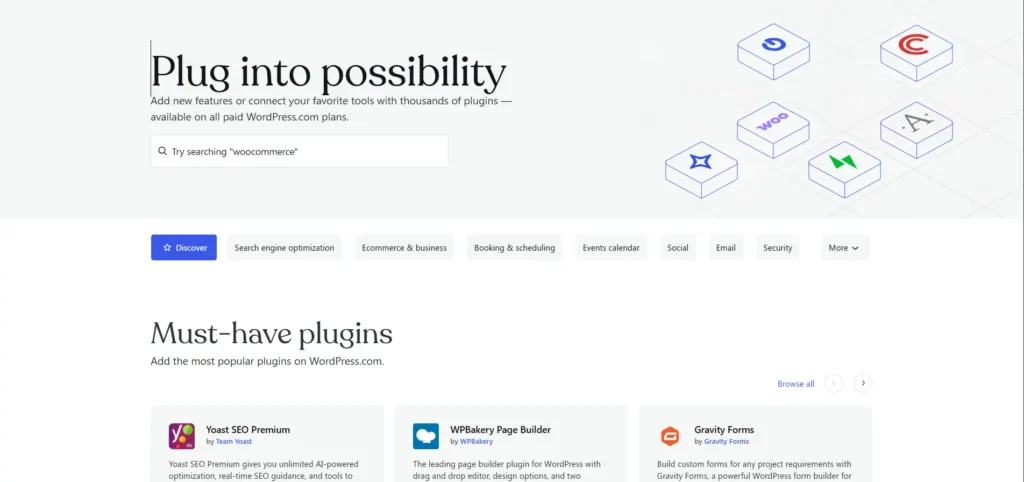
Once your plan is active, navigate to your site’s dashboard and click on Plugins in the left-hand menu. This is your gateway to the entire plugin ecosystem.
Step 4: Search and Install
Use the search bar to find the plugin you need. Browse by category, popularity, or rating. When you find one you want, click Install and then Activate. That is it. The plugin is live on your site and ready to configure.
Step 5: Configure and Customize
Most plugins have their own settings page where you can tailor them to your needs. Many come with setup wizards that walk you through the process step by step. Take a few minutes to configure each plugin properly, it makes a real difference in how well they work for you.
Pro tip: Start with just three or four essential plugins rather than installing everything at once. A focused approach keeps your site fast and avoids the overwhelm of configuring a dozen tools simultaneously. You can always add more later as specific needs come up.
Frequently Asked Questions
Final Thoughts
For a long time, WordPress.com users faced a frustrating choice: stay on an affordable plan and accept limited functionality, or pay significantly more just to access the tools that make WordPress so powerful. That trade-off no longer exists.
With 50,000+ plugins, Global Styles, font uploads, and CSS customization now available on every paid plan, WordPress.com has removed one of the biggest barriers that held people back. Whether you are a blogger writing your first post, a small business owner building your online presence, or an entrepreneur launching a new product, you now have the tools to build exactly the site you need, at a price that makes sense.
This is one of those rare updates that genuinely levels the playing field. You do not need to be on an expensive plan to build a professional, fully-featured website anymore. You just need a clear goal and the willingness to get started.
Ready to see what you can build? Head to WordPress.com, pick the plan that fits your budget, and start exploring those 50,000+ plugins today. Your site has a lot more potential than it did yesterday and now nothing is standing in your way.