This post contains affiliate links. If you make a purchase through these links, I may earn a commission at no extra cost to you.
The landscape of building a digital presence has shifted dramatically. If you had told a creator five years ago that they could go from a raw idea to a fully functioning, professional site in just minutes, they wouldn’t have believed you. But in 2026, artificial intelligence isn’t just a buzzword, it is the foundational engine driving the creator economy.
Today, whether you are wondering how to start a blog or launch a freelance portfolio, the barriers to entry have vanished. You don’t need a computer science degree, and you don’t need to spend weeks wrestling with code. Instead, you can describe what you want in plain language, and the AI acts as your collaborative assistant to build it alongside you.
What is an AI Website Builder?
An AI website builder is an intelligent tool that translates your plain-language prompts into a fully structured, professional website in minutes. Instead of manually coding or dragging elements, you describe your business, and the AI generates the design, layout, and copy, while leaving you in complete control.
In the past, building a site meant choosing between complex development environments or rigid templates. Today’s AI tools bridge that gap by interpreting your intent. It is important to note that this is not a magic button that creates a flawless masterpiece instantly. Instead, it is a highly capable starting point. The AI rapidly generates the architecture, but you refine, tweak, and polish it to match your exact brand voice.
Why Freelancers and Creators are Switching to AI Web Design in 2026
Freelancers and creators are adopting AI web design in 2026 because it drastically reduces development time from days to minutes while increasing earnings. By automating repetitive tasks, professionals can launch sites faster, focus on strategic growth, and leverage enterprise-grade security without a steep technical learning curve.
The data surrounding this shift is impossible to ignore. According to Hostinger’s 2026 business insights, 41% of businesses are now actively using AI-powered tools for website creation. For freelancers, the financial incentives are even clearer: recent Upwork data reveals that professionals utilizing AI tools earn 40% more per hour than those sticking to traditional methods.
This massive boost in productivity is reshaping the industry. Creators are no longer bogged down configuring servers or fighting with CSS. Instead, they rely on platforms that integrate with major tech entities natively. When the heavy lifting is handled by AI, you have more time to focus on integrating powerful tools like Rank Math for SEO, or deploying Cloudflare via managed hosts like Rocket.net for lightning-fast delivery.
Hands-On Walkthrough: Building with WordPress.com AI
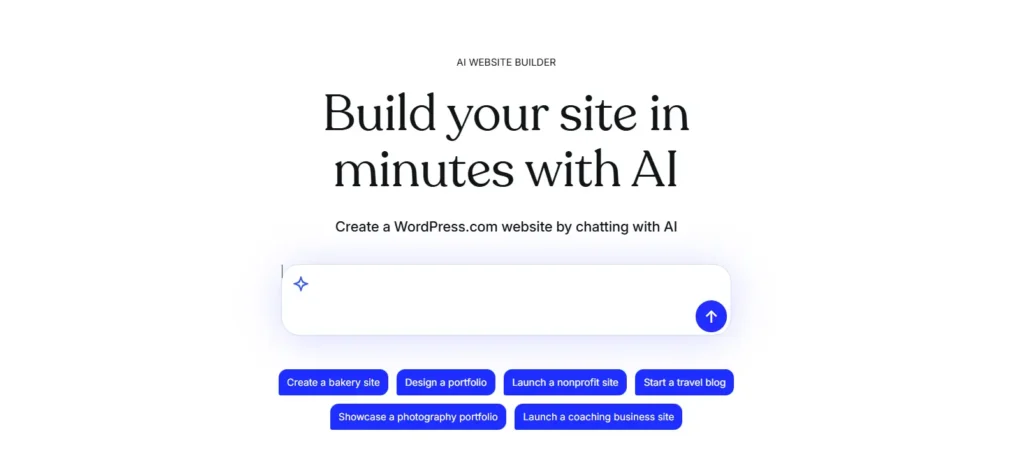
Creating a site with the WordPress.com AI builder involves answering a few simple questions about your goals, allowing the AI to generate the foundational design, and then collaboratively refining the output using a conversational sidebar. It combines the speed of AI with the flexibility of real WordPress blocks.
If you are ready to see this in action, the process is incredibly straightforward. You aren’t getting disposable AI code; you are getting a real, robust WordPress site.
Here is how you go from an idea to a live site in minutes:
- The Initial Prompt: Visit the WordPress.com AI Website Builder and share a bit about the type of website you want (e.g., a travel blog, business coaching, or a nonprofit).
- The Generation Phase: Submit your prompt, answer a few clarifying questions, and click “Create my site.” Watch as the AI builds your website’s foundation in just a few seconds.
- Conversational Refinement: This is where you stay in control. Once the draft is generated, a sidebar AI tool opens up. You can select specific elements and ask the AI to “Show me a color palette for my site in green” or “customize my fonts”.
- Block-Based Editing: Websites built with WordPress are constructed from individual blocks. If you don’t like a section, select it and prompt the AI to replace it, or simply use the block toolbar to reposition elements manually. You move effortlessly between AI automation and manual tweaks.
- Launch: When you are satisfied with your layout, new pages, and AI-generated images, simply click “Launch” at the top right.
Addressing the Security and Ownership Elephant
Modern AI website builders on established platforms prioritize security by handling automatic updates, SSL certificates, and threat blocking natively. Additionally, you retain full ownership of your content and design, ensuring that your digital asset remains yours without the vulnerabilities common in outdated, unpatched manual setups.
Security is a massive concern in 2026. Studies show that small and mid-size businesses now account for 43% of all cyberattacks, and alarmingly, 60% of small businesses that suffer a significant attack close permanently within six months.
When you use an isolated, hand-coded site, you are responsible for patching every vulnerability. With a platform like WordPress.com, the hosting, core security, and software updates are handled for you behind the scenes. This enterprise-grade protection means you can spend less time worrying about malware and more time exploring the best WordPress security plugins for added layer-two defense.
Is AI Replacing Human Web Designers?
No, AI is not replacing human web designers; rather, it serves as a highly efficient collaborative assistant. AI handles the heavy lifting of initial layout and structure, empowering creators to focus on strategic customization, branding, and user experience, which ultimately amplifies human creativity instead of eliminating it.
Industry authorities like Gartner and HubSpot consistently note that AI lacks human empathy and strategic nuance. The WordPress.com AI builder is designed to build with you, not instead of you. You are the creative director; the AI is simply your fastest, most eager intern.
FAQs
Final Thoughts on AI Website Creation
AI website creation represents a monumental leap in accessibility, allowing anyone to turn an idea into a live, professional site in minutes. By blending intelligent automation with the robust foundation of WordPress, creators and freelancers can scale their online presence efficiently while maintaining complete creative control.
The future of the web belongs to those who leverage tools to work smarter. If you are a freelancer looking to boost your output or a creator wanting to share your voice, there has never been a better time to start. Dive into the best AI productivity tools and see how much faster you can turn your vision into reality.
Ready to build? Try the WordPress.com AI Website Builder today.