Running a Shopify store without analytics is like driving at night with no headlights. You can do it — you just won’t see what’s about to hit you (or the opportunities you’re driving past).
Shopify’s built-in reports tell you what sold. They don’t tell you which ads actually made you money, which customers are worth chasing again, or why your conversion rate dropped last Tuesday. That’s where a dedicated analytics app earns its keep.
Quick take: If you just need GA4 hooked up properly, start free with Analyzely. If ad spend is eating your margin, TrueProfit or Triple Whale will show you real profit per channel. If you’re chasing repeat customers, Lifetimely’s cohort data is the best on the Shopify App Store. If you’re past $1M GMV and drowning in spreadsheets, Polar Analytics unifies everything into one dashboard.
We installed each of these on a test store, checked setup time, dashboard load speed, and how accurately each one matched Shopify’s own order data before ranking them below.
Quick Comparison: 9 Best Shopify Analytics Apps
| App | Best For | Starting Price | Free Plan? |
|---|---|---|---|
| Analyzely | GA4 integration | $19/month | Yes |
| TrueProfit | Net profit tracking | $35/month | Trial |
| Triple Whale | Ad attribution across channels | $219/month | Yes (limited) |
| Lifetimely | Customer LTV & cohort analysis | Free (up to 50 orders/mo) | Yes |
| Better Reports | Custom financial reports | $19.90/month | Trial |
| Polar Analytics | Unified BI dashboard | $470/month | Trial |
| Mipler | AI-powered dashboards | $39.99/month | Yes |
| Metorik | Inventory + customer combined | $20/month | Trial (30 days) |
| Report Pundit | Multi-store reporting | $9/month | Trial |
The 9 Best Shopify Analytics Apps in 2026
1. Analyzely – Best for GA4 Integration
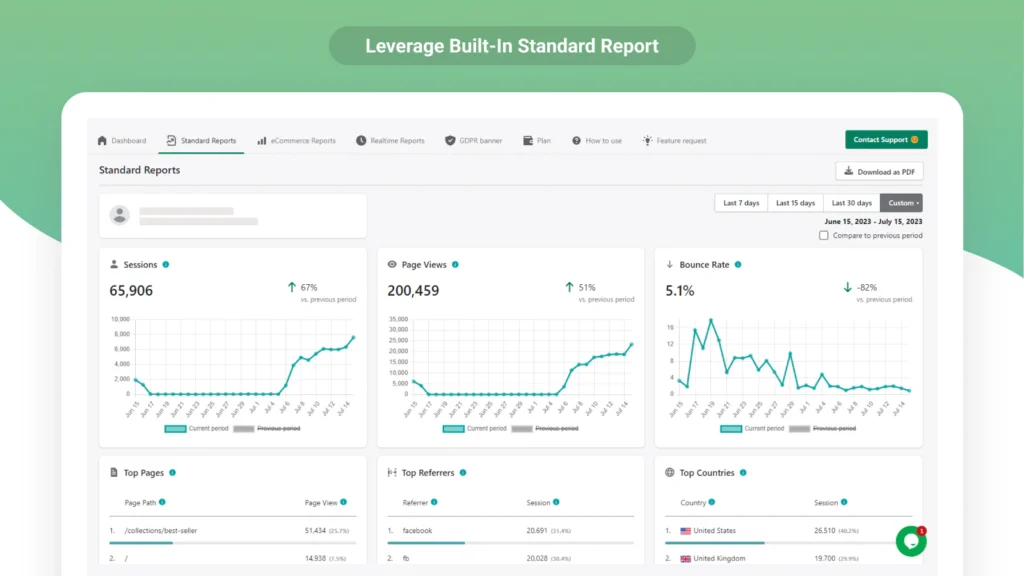
Analyzely connects Shopify to Google Analytics 4 with server-side event tracking, which means it bypasses ad blockers that would otherwise blind your GA4 data.
Key features:
- Automatic GA4 event mapping (purchases, add-to-cart, checkout steps)
- Server-side tracking for more accurate ad-blocker-proof data
- Ecommerce reporting dashboard on the paid tier
Pricing: Free plan includes GA4 integration. Pro is $19/month and adds ecommerce reports.
Why we like it: Fastest way to get GA4 actually working correctly on Shopify, most stores have this half-broken without realizing it.
Watch out for: The free plan is bare-bones; you’ll want Pro once you’re relying on the data for ad decisions.
Verdict: If you’re just getting started, install Analyzely first and get GA4 connected properly before anything else.
2. TrueProfit – Best for Net Profit Analytics
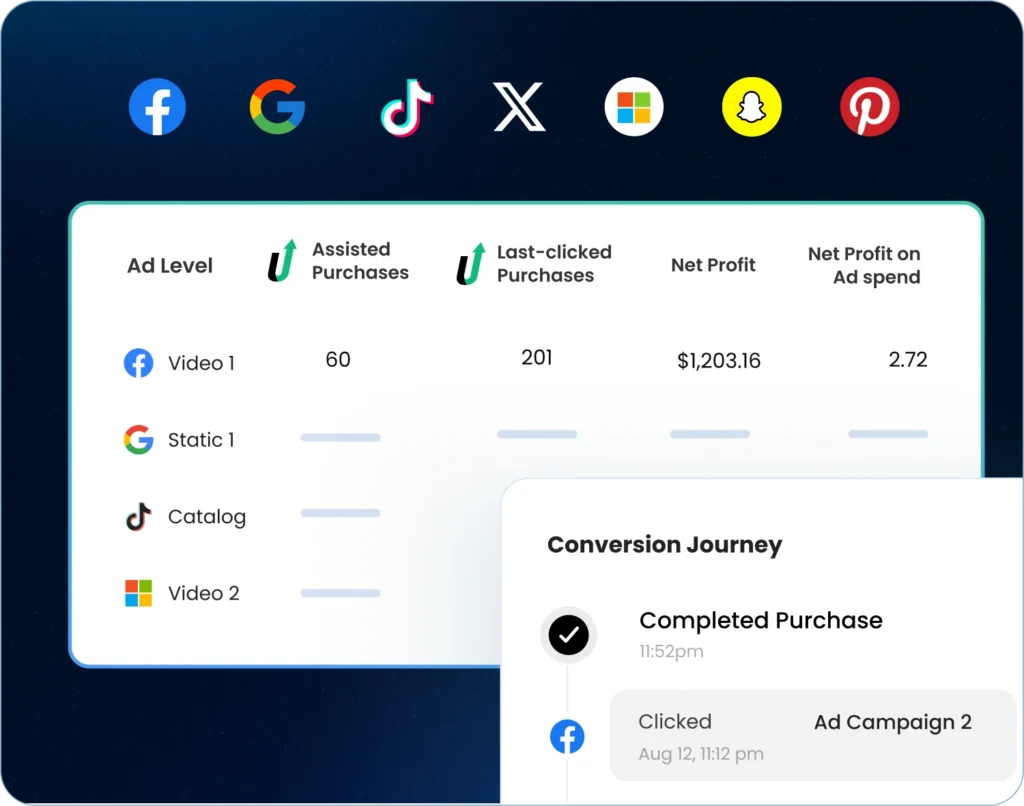
TrueProfit pulls in ad spend from Meta, Google, and TikTok and nets it against COGS, shipping, and fees to show your actual profit, not just revenue.
Key features:
- Real-time net profit dashboard (revenue minus all costs)
- Ad spend sync from major platforms
- Product-level profit breakdown
Pricing: $35/month (Basic), up to $100/month (Ultimate). 14-day free trial.
Why we like it: Revenue looks great until you see what ads and fees are actually costing you and this is the app that shows you the real number.
Watch out for: No free tier, and the ultimate plan gets pricey fast for smaller stores.
Verdict: For most store owners, seeing net profit instead of revenue is a surprisingly big deal worth the trial the moment you start running paid ads.
3. Better Reports – Best for Custom Financial Reports
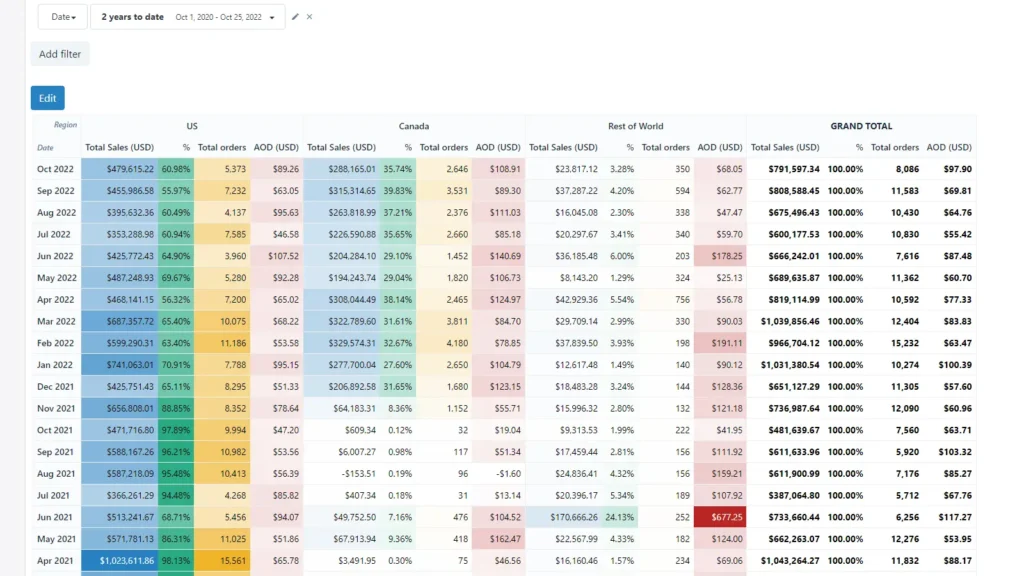
Better Reports is the spreadsheet person’s dream: build any custom report, schedule it to email your team, and export to PDF or Excel automatically.
Key features:
- Fully custom report builder (no coding needed)
- Scheduled email delivery to team members
- PDF/Excel export
Pricing: $19.90–$149.90/month depending on tier. Free trial available.
Why we like it: If you need a specific report format for your accountant or investors, this is the fastest way to build it without hiring a developer.
Watch out for: Steeper learning curve than the plug-and-play apps on this list — it’s a report builder, not a pre-made dashboard.
Verdict: Best for stores with a finance or ops person who wants full control over what gets reported and to whom.
4. Mipler – Best for AI-Powered Dashboards
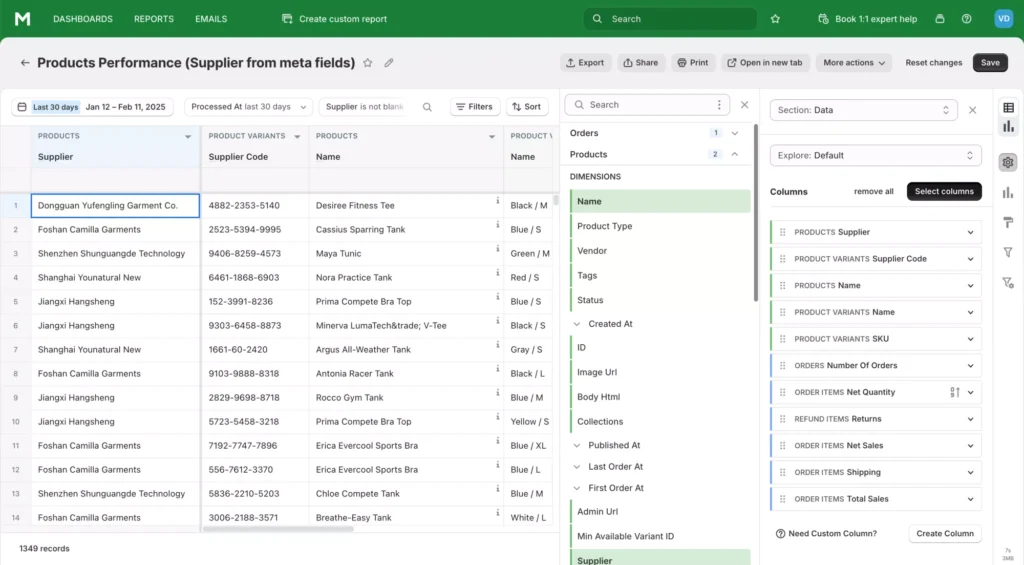
Mipler gives you 60+ pre-built reports plus AI-assisted customization if you want to tweak them without learning a query language.
Key features:
- 60+ pre-built report templates
- AI-powered report customization
- Advanced segmentation options
Pricing: Free plan supports up to 1,000 lifetime orders. Advanced plan is $39.99/month.
Why we like it: The pre-built report library alone saves hours compared to building from scratch.
Watch out for: The free plan’s lifetime order cap means growing stores will outgrow it quickly.
Verdict: Good middle ground for stores that want more than basic reporting but aren’t ready for a full BI tool.
5. Report Pundit – Best for Multi-Store Reporting
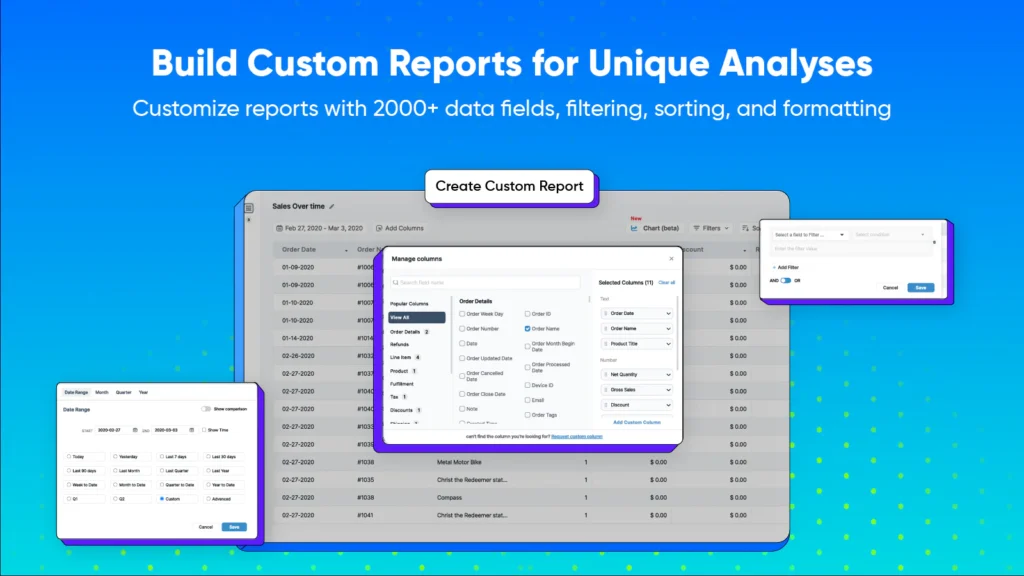
If you run more than one Shopify store, Report Pundit consolidates reporting across all of them and connects with 30+ other apps for extended data.
Key features:
- Multi-store consolidated reporting
- Integrates with 30+ third-party apps
- Custom report scheduling
Pricing: Starts at $9/month for Basic. 7-day free trial.
Why we like it: Cheapest entry point on this list, and the multi-store view is rare at this price.
Watch out for: Interface feels dated compared to newer entrants like Mipler or Metorik.
Verdict: Best budget pick if you’re managing multiple storefronts and need one consolidated view.
6. Triple Whale – Best for Cross-Channel Attribution
Triple Whale is built for stores spending real money on ads and needing to know which channel actually drove the sale, not just which one got the last click.
Key features:
- Blended attribution across Meta, Google, and TikTok
- 12-month lookback with first/last-click views on the free plan
- Sonar Send: enriches Klaviyo flows with attribution data
Pricing: Free plan (up to 10 users, 12-month lookback). Foundation $219/month, Automate $749/month. Pricing scales with GMV above $5M.
Why we like it: Genuinely useful for untangling multi-channel ad spend once you’re running more than one platform at once.
Watch out for: Jumps in price fast as your GMV grows — this is an app for stores already spending meaningfully on ads, not casual users.
Verdict: Best for stores running paid acquisition on 2+ channels who need to know what’s actually working.
7. Lifetimely – Best for Customer LTV & Cohort Analysis
Lifetimely specializes in one thing and does it better than anyone else on the Shopify App Store: showing you what a customer is actually worth over time, not just what they spent today.
Key features:
- Cohort analysis by acquisition month/channel
- Predictive LTV modeling trained across 45,000+ stores
- Profit tracking layered on top of LTV data
Pricing: Free up to 50 orders/month. Paid tiers scale by order volume: M ($149/mo), L ($299/mo), XL ($499/mo) — all features included at every tier.
Why we like it: 4.8/5 on the Shopify App Store across 490+ reviews — the cohort reporting here is genuinely best-in-class, not marketing copy.
Watch out for: Pricing is based on order volume, not features, so it can feel steep for high-order, low-AOV stores.
Verdict: If retention and repeat-purchase behavior matter more to your business than one-time acquisition, this is the app to install.
8. Polar Analytics – Best for Unified BI Dashboards
Once you’re managing data across Shopify, ad platforms, email, and a warehouse spreadsheet or two, Polar Analytics pulls it all into one place with a dedicated Snowflake database behind it.
Key features:
- Unified dashboard across Shopify, ad platforms, and email tools
- Dedicated Snowflake data warehouse and first-party pixel
- Multi-touch attribution and custom reporting on higher tiers
Pricing: Audiences from $470/month, AI-Analytics from $810/month, priced on GMV. Free trial available.
Why we like it: This is the closest thing to a real BI layer built specifically for Shopify brands, genuinely useful once spreadsheets stop scaling.
Watch out for: Priced for scaled brands, not small stores, this is not a starter app.
Verdict: Best for operators past $1M+ GMV who are tired of stitching together five tools manually.
9. Metorik – Best for Inventory + Customer Analytics Combined
Metorik is the one app on this list that treats inventory and sales as one dataset instead of two separate reports showing you profit margin and stock velocity side by side.
Key features:
- Stock velocity and inventory forecasting
- Profit-by-product with reorder signals
- Real-time dashboards with cohort views
Pricing: Core 100 ($20/month, up to 100 orders), scaling up to Plus 500 ($75/month). 30-day free trial.
Why we like it: Most analytics apps ignore inventory entirely, this is the one built for merchants who need to know what to reorder, not just what sold.
Watch out for: Pricing scales with order volume, so high-volume stores will land in a higher tier than the entry price suggests.
Verdict: Best for product-heavy stores that need sales and inventory data in the same dashboard instead of juggling two apps.
How to Pick the Right Shopify Analytics App
- Just need GA4 working properly? → Analyzely
- Running ads and want real profit, not revenue? → TrueProfit or Triple Whale (if multi-channel)
- Care more about repeat customers than one-time sales? → Lifetimely
- Need custom reports for your team or accountant? → Better Reports
- Past $1M GMV and drowning in spreadsheets? → Polar Analytics
- Product-heavy store that needs inventory + sales together? → Metorik
- Running multiple stores? → Report Pundit
A practical rule: buy the tool that answers the recurring question your team can’t settle with Shopify’s native dashboard alone, don’t stack five apps just because they’re cheap.
FAQs
Does Shopify have built-in analytics?
Yes, Shopify includes basic sales, traffic, and conversion reports. But it doesn’t track true net profit, multi-touch attribution, or customer lifetime value, which is where these apps come in.
What’s the best free Shopify analytics app?
Analyzely (for GA4) and Lifetimely (up to 50 orders/month) both have genuinely usable free plans, not just trials.
Will an analytics app slow down my store?
Most reputable apps use server-side or async tracking that doesn’t touch your storefront’s load speed. Avoid apps that inject heavy client-side scripts on every page.
What’s the difference between revenue tracking and profit tracking?
Revenue is what customers paid you. Profit subtracts COGS, shipping, ad spend, and fees. TrueProfit and Metorik are built specifically to show the profit number.
Can I run multiple analytics apps at once?
Yes, most stores do, for example, Analyzely for GA4 plus Lifetimely for cohorts. Just watch for overlapping tracking pixels that can double-count events.
Which app is best for beginners?
Analyzely’s free tier is the easiest starting point with no setup complexity, and it fixes GA4 tracking immediately.
Do I need a developer to install these?
No. All 9 apps on this list install directly from the Shopify App Store with guided setup — no code required.
Is it worth paying for analytics if I’m a small store?
If you’re doing under $5,000/month in revenue, Shopify’s native reports plus a free-tier app (Analyzely or Lifetimely) is usually enough. Paid tiers start earning their cost once you’re running ads or managing repeat-customer campaigns.
How is GA4 different from these Shopify-native apps?
GA4 is best for site-wide behavior and marketing attribution across your whole funnel; Shopify-native apps like TrueProfit and Metorik are better at ecommerce-specific numbers like true profit margin and inventory that GA4 doesn’t track.
Which app is best for agencies or multi-store operators?
Report Pundit for straightforward consolidated reporting across stores; Polar Analytics if you need a full BI layer across multiple brands.
Can I export this data to Google Sheets or a data warehouse?
Better Reports and Report Pundit both export to Excel/PDF directly. Polar Analytics goes further with a dedicated Snowflake warehouse built in.
Which app is best if I’m running ads on multiple platforms?
Triple Whale is purpose-built for this, it blends attribution across Meta, Google, and TikTok instead of giving each platform its own siloed view.
How long does setup typically take?
Analyzely, Mipler, and Report Pundit are usually live within 10–15 minutes. Polar Analytics and Triple Whale take longer since they involve connecting multiple ad accounts and data sources.
Final Thoughts
Analytics shouldn’t be reserved for stores doing $1M+ a year. Start with a free tool that fixes a real gap like Analyzely for GA4, Lifetimely for customer value and then add a paid app as a specific need shows up: TrueProfit or Triple Whale when you’re spending on ads, Metorik when inventory becomes the bottleneck, Polar Analytics once you’ve outgrown spreadsheets entirely.