This post contains affiliate links. If you make a purchase through these links, I may earn a commission at no extra cost to you.
In 2026, the digital landscape is more fragmented and volatile than ever. As cyber threats leverage generative AI to automate attacks, the “it won’t happen to me” mindset has become a business-killing liability. Whether you are running a simple blog or a complex store, security and backups are the bedrock of your digital survival.
The statistics are sobering: a new website is hacked every 39 seconds, and the average cost of a data breach has surpassed $4.5 million. Beyond financial losses, compromised websites face damaged reputations, lost customer trust, and potential legal consequences. Meanwhile, hardware failures, human errors, and malicious attacks can destroy years of content and data in seconds.
This article explores why website security and backups must be top priorities in 2026, and how tools like Jetpack provide comprehensive protection for WordPress sites. We’ll examine the current threat landscape, the real costs of inadequate protection, and actionable strategies for securing your digital assets.
The Evolving Threat Landscape in 2026
1. AI-Powered “Polymorphic” Malware
Traditional antivirus software struggles in 2026 because hackers use AI to create polymorphic malware code that changes its signature every time it replicates. These infections often hide within WordPress backup plugins or nulled themes, staying dormant until they trigger a massive data leak.
2. Hyper-Automated Botnets
Modern botnets don’t just guess passwords; they use “credential stuffing” from massive 2025 leaks to bypass standard logins. If you aren’t using solid security protocols, your site is likely probed by automated scripts every few seconds.
3. Supply Chain Vulnerabilities
Attackers now target the “middleman.” By exploiting a single vulnerable plugin used by millions, they gain a backdoor into your site. This makes regular security audits and real-time monitoring essential.
The Cost of Security Breaches
The financial impact of security breaches extends far beyond immediate cleanup costs. Website owners face multiple expense categories when compromised.
Direct costs include:
- Professional security services to identify and remove malware
- Revenue loss during downtime (averaging $5,600 per minute for e-commerce sites)
- Customer notification expenses for data breaches
- Legal fees and potential regulatory fines
Indirect costs often prove even more damaging:
- Lost customer trust and reduced conversion rates
- Damaged search engine rankings (Google blacklists compromised sites)
- Decreased brand reputation that persists long after cleanup
- Opportunity costs from time spent on recovery instead of growth
Understanding Website Backups: Your Safety Net
What Happens When Disaster Strikes
Imagine logging into your website tomorrow morning and finding everything gone. Your content, customer data, product listings, transaction history all vanished. This nightmare scenario happens more often than you might think, caused by:
Server failures where hosting infrastructure experiences hardware malfunctions or data center issues. Despite backup systems, hosting providers cannot always prevent total data loss.
Human error including accidental deletions, failed updates, or configuration mistakes that break your site. Even experienced administrators make mistakes that can have catastrophic consequences.
Malicious attacks that don’t just compromise your site but intentionally destroy data to maximize damage or cover their tracks.
Plugin or theme conflicts that corrupt databases during updates, leaving your site in an unstable or unrecoverable state.
Without recent backups, recovery from any of these scenarios ranges from extremely difficult to impossible.
The True Value of Automated Backups
Manual backups sound responsible in theory but fail in practice. Website owners inevitably forget, postpone, or improperly execute manual backup procedures. By the time disaster strikes, their most recent backup is weeks or months old, representing massive data loss.
Automated backup solutions like those provided by Jetpack eliminate human error from the equation. Jetpack creates real-time backups of your entire WordPress site, including databases, media files, plugins, and themes. Every change is captured automatically, ensuring you never lose more than a few minutes of work.
Backup Frequency Matters
Different websites require different backup frequencies based on how often content changes and the value of that content.
| Website Type | Recommended Backup Frequency | Reason |
| E-commerce Store | Real-time / Every hour | New orders, inventory changes, customer data |
| Business Blog | Daily | Regular content updates, comments, user interactions |
| Portfolio Site | Weekly | Infrequent updates, mostly static content |
| Membership Site | Daily / Real-time | User registrations, content access, payments |
| News/Media Site | Hourly / Real-time | Constant content publishing, high update frequency |
Jetpack’s backup solutions offer flexible scheduling, from daily backups for smaller sites to real-time backup capabilities for high-traffic or e-commerce websites where every transaction matters.
Why Jetpack Is the Comprehensive Solution

All-in-One Security and Backup Platform
Jetpack stands out as a comprehensive solution that addresses both security and backups through a single, unified platform. Rather than installing multiple plugins that might conflict or create security vulnerabilities themselves, Jetpack provides integrated protection that works seamlessly together.
Real-Time Backup Capabilities
Jetpack’s real-time backup feature captures every change as it happens. Whether you publish a new blog post, a customer places an order, or someone updates their profile, Jetpack creates an instant backup. This means you can restore your site to any point in time, recovering from mistakes or attacks with minimal data loss.
The backup system includes:
- Complete database backups capturing all content and settings
- Full media library backups preserving images, videos, and documents
- Plugin and theme file backups ensuring complete site restoration
- One-click restore functionality for quick recovery
Advanced Security Features
Jetpack’s security capabilities extend far beyond basic protection. The platform includes:
- Automated malware scanning that checks your site daily for malicious code, suspicious files, and known vulnerabilities. When threats are detected, you receive immediate alerts with detailed information about the issue and recommended actions.
- Brute force attack protection that automatically blocks repeated login attempts from suspicious IP addresses. This prevents attackers from guessing passwords through systematic attempts, one of the most common attack methods.
- Downtime monitoring that checks your site every five minutes and sends instant notifications if your site goes offline. Quick awareness of downtime enables faster response and minimal business impact.
- Spam protection powered by Akismet, protecting comment sections and contact forms from spam submissions that can bog down your site and frustrate legitimate visitors.
- Activity log that records every change made to your site, including who made it and when. This audit trail proves invaluable for troubleshooting issues, identifying unauthorized access, and maintaining accountability on multi-user sites.
Easy Restoration Process
Having backups means nothing if you can’t restore them quickly when needed. Jetpack simplifies the restoration process through an intuitive interface that lets you:
- Browse backups by date and time
- Preview backup contents before restoring
- Restore entire sites or individual files
- Download backup files for offline storage
- Restore to the same site or a different location
This flexibility ensures you can recover from any scenario, whether you need to undo a bad plugin update or rebuild your entire site after a server failure.
Best Practices for Website Security in 2026
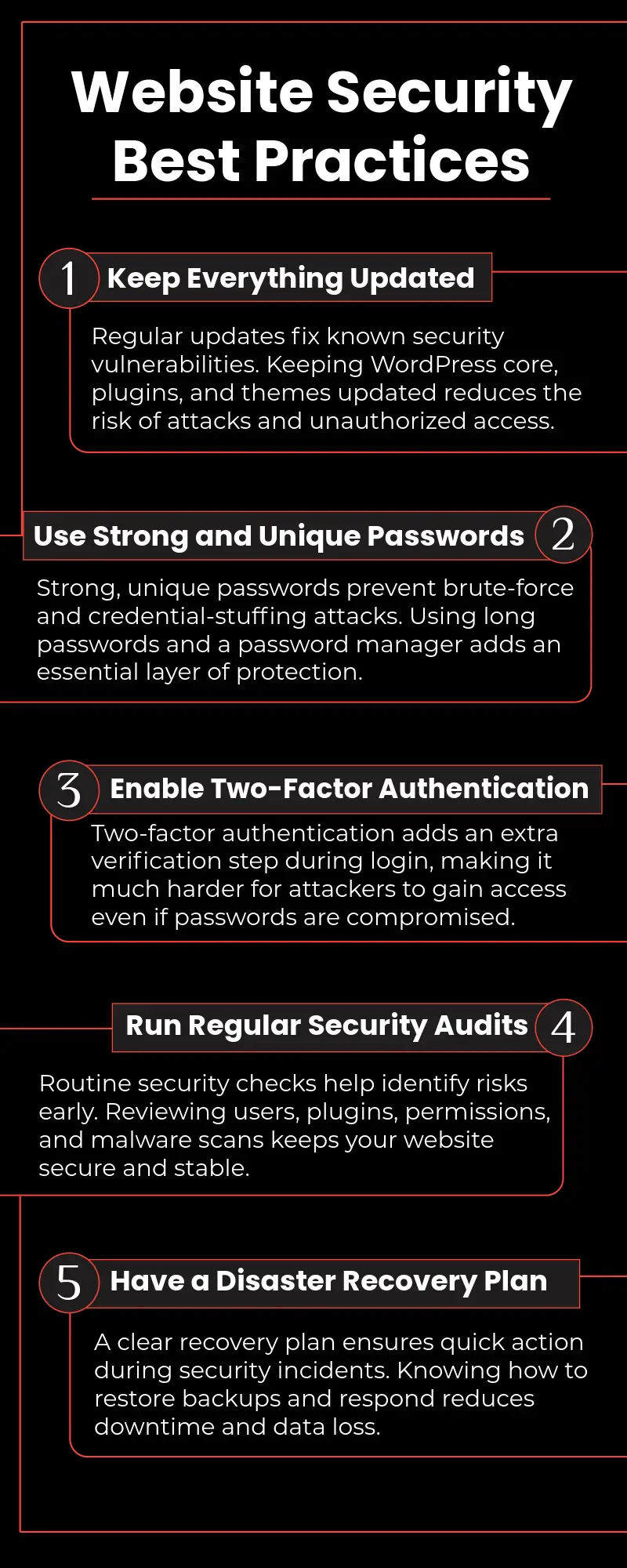
Keep Everything Updated
Software updates aren’t just about new features, they primarily address security vulnerabilities. When developers discover security flaws, they release patches through updates. Delaying updates leaves your site vulnerable to known exploits that attackers actively seek.
Establish an update routine:
- Enable automatic updates for WordPress core
- Review and install plugin updates weekly
- Test theme updates in a staging environment before applying to production
- Subscribe to security bulletins for your essential plugins
Use Strong, Unique Passwords
Despite being security basics, weak passwords remain one of the most common vulnerabilities. Attackers maintain databases of billions of compromised passwords from previous breaches and use them to attempt access across multiple sites.
Password best practices include:
- Minimum 16 characters combining letters, numbers, and symbols
- Unique passwords for every account and service
- Password manager tools to generate and store complex passwords
- Regular password changes for administrative accounts
- Two-factor authentication for additional protection
Regular Security Audits
Periodic security audits help identify potential vulnerabilities before attackers exploit them. Jetpack’s security scanning provides automated audits, but manual reviews offer additional insights:
Review user accounts and remove unnecessary access. Check plugin and theme lists, removing anything unused. Verify file permissions are properly configured. Test backup restoration to ensure backups actually work.
Implement a Disaster Recovery Plan
Having backups isn’t enough, you need a tested plan for using them. Your disaster recovery plan should document:
- How to access your backups
- Step-by-step restoration procedures
- Emergency contact information for your hosting provider
- Alternative access methods if your primary login is compromised
- Communication templates for notifying customers about security incidents
Practice your disaster recovery plan annually to ensure it works when you need it.
Common Security Mistakes to Avoid
Assuming “It Won’t Happen to Me”
The most dangerous security mistake is assuming your site isn’t a target. Attackers don’t just pursue high-profile targets that they use automated tools to scan millions of sites looking for any vulnerability. Small personal blogs get hacked as frequently as large corporate sites because attackers aren’t selective when using automated attacks.
Relying Solely on Hosting Provider Backups
Many hosting providers offer backup services, but these shouldn’t be your only backups. Hosting backups might:
- Not include all your files
- Have limited retention periods
- Become inaccessible during hosting issues
- Prove difficult to restore quickly
Jetpack’s independent backup system ensures you maintain control over your data regardless of hosting provider issues.
Neglecting Mobile Security
Many administrators manage websites from mobile devices but overlook mobile security. Ensure your phone or tablet has:
- Strong passcode or biometric protection
- Up-to-date operating system and apps
- Secure Wi-Fi connections (avoid public Wi-Fi for admin tasks)
- Remote wipe capabilities if the device is lost or stolen
Ignoring Warning Signs
Websites often show warning signs before a complete compromise occurs. Don’t ignore:
- Unexpected changes to site content
- Unfamiliar user accounts
- Unusual traffic patterns
- Slow site performance
- Strange error messages
- Notifications from Jetpack security scans
Investigating these early indicators can prevent minor issues from becoming major crises.
Implementing Your Security and Backup Strategy
Getting Started with Jetpack
Implementing comprehensive security and backups through Jetpack is straightforward:
Install the Jetpack plugin from the WordPress plugin directory. Connect your site to WordPress.com to enable Jetpack features. Select a Jetpack plan that includes the security and backup features you need. Configure your backup schedule and security settings. Review the activity log to establish baseline site activity.
Within minutes, your site benefits from enterprise-grade security and automated backups.
Creating a Security Checklist
Develop a regular security maintenance checklist:
Weekly tasks:
- Review Jetpack security scan results
- Check for available plugin and theme updates
- Review recent activity log entries
- Verify backups are running successfully
Monthly tasks:
- Review user accounts and permissions
- Test backup restoration process
- Update passwords for critical accounts
- Review site performance metrics
Quarterly tasks:
- Conduct comprehensive security audit
- Test disaster recovery procedures
- Review and update security documentation
- Evaluate new security features or tools
Educating Your Team
If multiple people manage your website, ensure everyone understands security best practices. Conduct training sessions covering:
- Password management and two-factor authentication
- Recognizing phishing attempts
- Proper plugin and theme update procedures
- What to do if they suspect a security issue
- How to use Jetpack security features
Security is only as strong as your least informed team member.
Frequently Asked Questions
How often should I back up my WordPress site?
Backup frequency depends on how often your content changes and your tolerance for data loss. E-commerce sites processing transactions should use real-time backups through Jetpack to capture every order. Blogs publishing daily should back up at least once per day. Sites with weekly updates can use weekly backups. Remember that more frequent backups mean less potential data loss if restoration becomes necessary.
Can I rely on my hosting provider’s backup service?
While hosting provider backups offer some protection, they shouldn’t be your only backup solution. Hosting backups may have limitations on retention periods, restoration options, or accessibility during server issues. Jetpack’s independent backup system ensures you always have access to your data regardless of hosting provider status. Consider hosting backups as a secondary safety net rather than your primary backup solution.
How do I know if my website has been hacked?
Common signs of compromise include unexpected content changes, unfamiliar user accounts, unusual traffic patterns, spam being sent from your domain, and search engines showing security warnings for your site. Jetpack’s malware scanning automatically detects most security issues and sends alerts. Additionally, monitor your activity log for unauthorized changes and install security scanning tools to proactively identify vulnerabilities.
Are free security plugins sufficient for protecting my website?
Free security plugins provide basic protection but typically lack comprehensive features like real-time backups, advanced malware scanning, and downtime monitoring. For business-critical websites, investing in a complete solution like Jetpack provides significantly better protection and peace of mind. The cost of professional security tools is minimal compared to the potential losses from security breaches or data loss.
How long should I retain backups?
Retention periods depend on your needs and storage capacity. At minimum, maintain daily backups for the past 30 days to cover most recovery scenarios. E-commerce sites should retain backups for 90 days or longer to comply with payment card industry requirements and handle customer disputes. Jetpack’s backup plans include 30-day retention as standard, with options for extended retention periods. Consider keeping monthly archives indefinitely for long-term reference.
Do I need technical expertise to manage website security?
While deep technical knowledge helps, modern security solutions like Jetpack are designed for users of all skill levels. The plugin provides clear interfaces, automated protections, and actionable alerts that don’t require technical expertise to understand or act upon. For complex security issues, Jetpack’s documentation and support resources provide guidance. The key is staying proactive and responding to security notifications promptly.
Conclusion
In 2026, website security and backups are essential, not optional. Threats are constant, and the cost of inadequate protection, financial loss, reputational damage, and lost data is huge.
Jetpack provides complete, unified protection for WordPress sites, including security monitoring, malware scanning, brute force defense, and automated backups. It replaces multiple, complex plugins with one professionally maintained solution.
You cannot afford to skip investing in security and backups; not protecting your site is a serious gamble. Install Jetpack today, configure settings, enable backups, and establish maintenance. This foresight will prevent catastrophic loss. Your website is your business, protect it.